
Platformer graph tour
Trace four real Platformer methods from their graph shape to the exact C# statements that drive the game.
On this page
Four methods tell most of the game’s story. Read the exec wire first, then compare each card with the source statement below it. The snippets preserve the real statements; source comments are omitted so the control flow stays visible.
CollectCoin
Section titled “CollectCoin”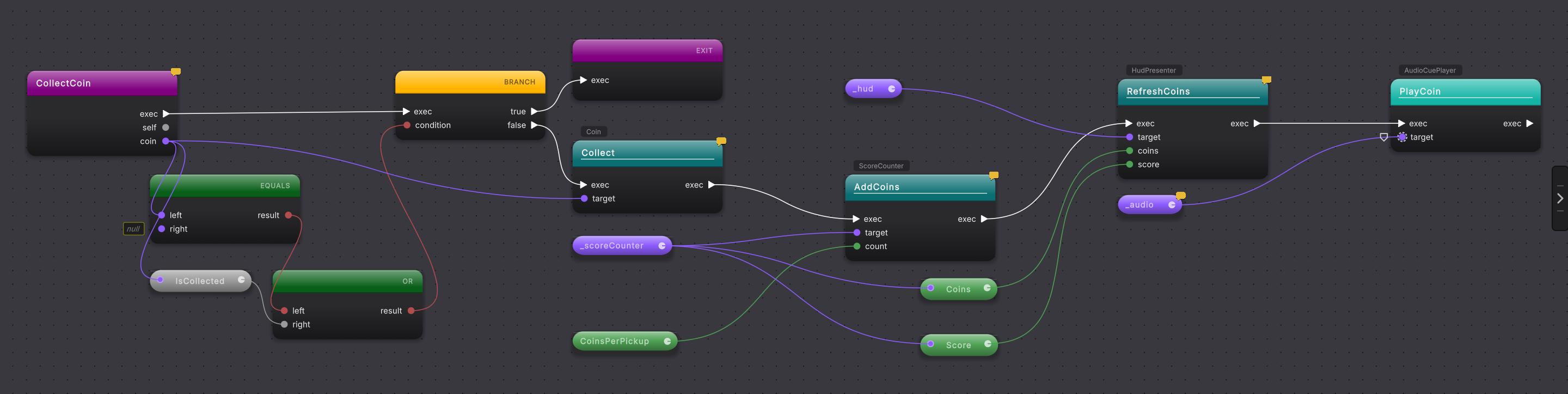
The first branch refuses a null or already collected coin. The second refuses to proceed without the score counter and HUD. The successful path then crosses three kinds of boundary: a local collision object, scene references, and an optional composed service.
public void CollectCoin(Coin coin){    if (coin == null || coin.IsCollected)    {        return;    }
    if (_scoreCounter == null || _hud == null)    {        _logger?.LogWarning(            "player controller cannot collect a coin; its score counter or HUD reference is " +            "unassigned. wire both on the player to enable coin collection.");        return;    }
    coin.Collect();    _scoreCounter.AddCoins(CoinsPerPickup);    _hud.RefreshCoins(_scoreCounter.Coins, _scoreCounter.Score);    _audio?.PlayCoin();}
Read the calls left to right. coin.Collect() makes the pickup idempotent at the coin. AddCoins changes shared progress. RefreshCoins presents the new values. _audio?.PlayCoin() runs only when the optional service exists.
StompEnemy
Section titled “StompEnemy”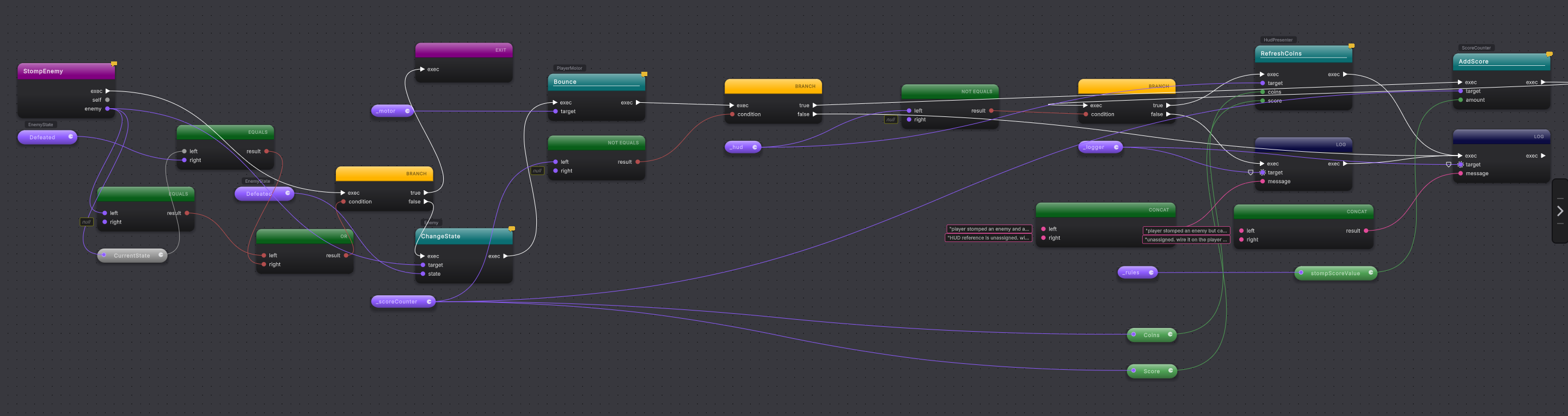
The opening guard makes a second stomp a no-op. State and movement happen before scoring, so the enemy still falls and the player still bounces when the scoring scene reference is absent.
public void StompEnemy(Enemy enemy){    if (enemy == null || enemy.CurrentState == EnemyState.Defeated)    {        return;    }
    enemy.ChangeState(EnemyState.Defeated);    _motor.Bounce();
    if (_scoreCounter != null)    {        _scoreCounter.AddScore(_rules.stompScoreValue);        if (_hud != null)        {            _hud.RefreshCoins(_scoreCounter.Coins, _scoreCounter.Score);        }        else        {            _logger?.LogWarning(                "player stomped an enemy and awarded score, but cannot refresh the HUD; the " +                "HUD reference is unassigned. wire it on the player to show stomp scoring.");        }    }    else    {        _logger?.LogWarning(            "player stomped an enemy but cannot award score; the score counter reference is " +            "unassigned. wire it on the player to enable stomp scoring.");    }}
The _rules.stompScoreValue GET pill is the useful data trail. Follow it into AddScore to see that the amount comes from the LevelRules asset, not a hidden literal on the graph.
OnCoinCountChanged
Section titled “OnCoinCountChanged”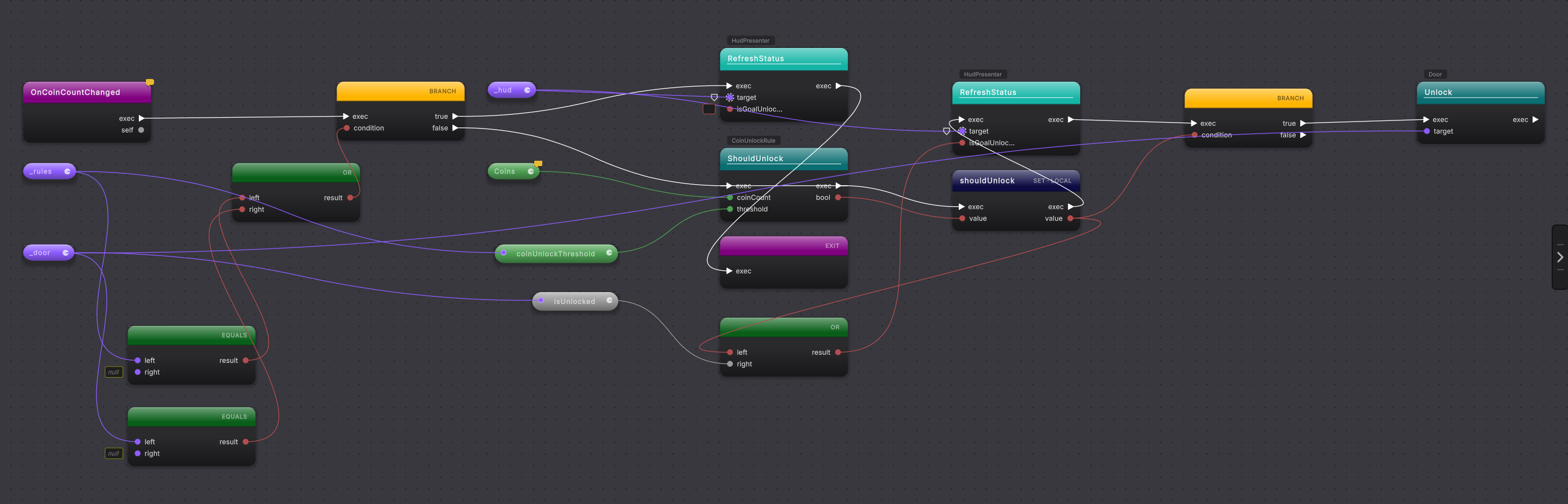
This method is called once during configuration and after every coin change. Missing references keep the goal closed in the HUD. With both references present, a pure rule calculates the threshold answer.
public void OnCoinCountChanged(){    if (_rules == null || _door == null)    {        _hud?.RefreshStatus(isGoalUnlocked: false);        return;    }
    var shouldUnlock = CoinUnlockRule.ShouldUnlock(Coins, _rules.coinUnlockThreshold);    _hud?.RefreshStatus(shouldUnlock || _door.IsUnlocked);
    if (shouldUnlock)    {        _door.Unlock();    }}
The local shouldUnlock feeds both presentation and behavior. The HUD stays open after the door opens because its condition also reads _door.IsUnlocked. The final branch calls Door.Unlock only when the rule returns true, and CoinUnlockRule.ShouldUnlock is one line: coinCount >= threshold. Change coinUnlockThreshold on the LevelRules asset and the same graph opens the goal after a different number of coins.
ApplyState
Section titled “ApplyState”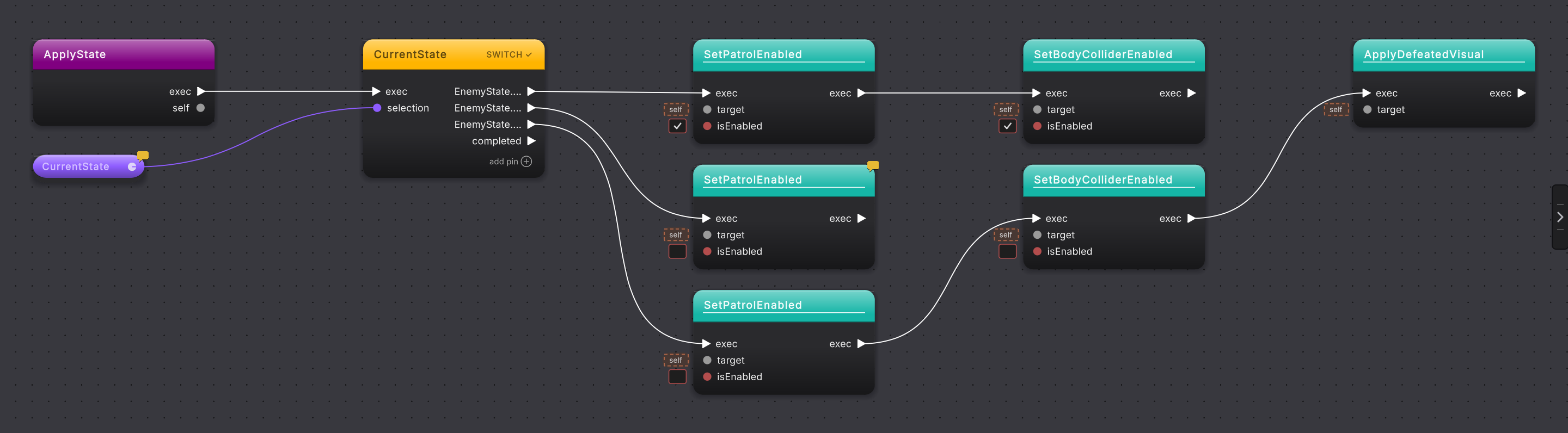
ApplyState turns an enum into behavior. Patrolling enables movement and collision. Stunned stops movement while leaving the body present. Defeated stops movement, disables the body collider, and swaps the visual.
private void ApplyState(){    switch (CurrentState)    {        case EnemyState.Patrolling:            SetPatrolEnabled(true);            SetBodyColliderEnabled(true);            break;
        case EnemyState.Stunned:            SetPatrolEnabled(false);            break;
        case EnemyState.Defeated:            SetPatrolEnabled(false);            SetBodyColliderEnabled(false);            ApplyDefeatedVisual();            break;    }}
The switch node is the map. Each arm names a state, and the helper calls keep the cards readable without hiding the exact method sequence.
Try the tour yourself
Section titled “Try the tour yourself”- Add
Assets/Platformer/Runtimewith Assets > Round Trip > Add Folder to Round Trip. - Open each method in the order on this page.
- For every branch or switch, say which data pin chooses the path before reading the source.
- Double-click the active method title to open the same method in your code editor and check the statement order.