
Flow nodes
Read the nodes that start a method, choose paths, repeat work, handle errors, and mark source Round Trip cannot own.
On this page
Flow nodes answer the question that matters when reading a method: what can run next? Follow the white exec wire first, then inspect the colored data wires that decide or feed each step.
Entry and return
Section titled “Entry and return”Purpose. Entry is the start of a method. Parameters leave it as data outputs. Return ends that path and can carry the method’s result. On the canvas a return is titled EXIT. Place one from the return row in the flow-control actions; it comes with a value pin of the method’s return type, or none in a void method.
| Pin | Direction | Type |
|---|---|---|
| exec | Entry output | exec |
| each parameter | Entry output | Declared parameter type |
| exec | Return input | exec |
| value | Return input | Declared return type, omitted for void |
private bool HasEnoughCoins(int coins, int required){ return coins >= required;}Guide: Return and throw.
Branch
Section titled “Branch”Purpose. Branch chooses the true path or false path from a Boolean condition. The node is titled BRANCH and is placed from the branch row. An else if chain appears as branches connected through false paths.
| Pin | Direction | Type |
|---|---|---|
| exec | Input | exec |
| condition | Input | bool |
| true | Output | exec |
| false | Output | exec |
if (coin.IsCollected){ return;}else{ coin.Collect();}Guide: Branch.
Purpose. Loop nodes repeat a body. The header changes by shape: a for loop is titled by its loop variable with FOR on the right and has range or C-style parts, foreach has a collection and current item, and while or do while has a condition. A range for takes first index, last index, and step, and a bound that is a value, such as collision.contactCount, arrives on its pin as a wire. The C-Style view replaces those pins with condition and adds initializer and iterator exec outputs.
| Pin | Direction | Type |
|---|---|---|
| exec | Input | exec |
| condition, first index, last index, step, or collection | Input | bool, numeric, or collection type |
| loop body | Output | exec |
| completed | Output | exec |
| index or item | Output | Loop variable type, when the loop declares one |
private void UpdateGrounded(Collision2D collision){ for (var i = 0; i < collision.contactCount; i++) { if (collision.GetContact(i).normal.y > GroundNormalThreshold) { _grounded = true; return; } }}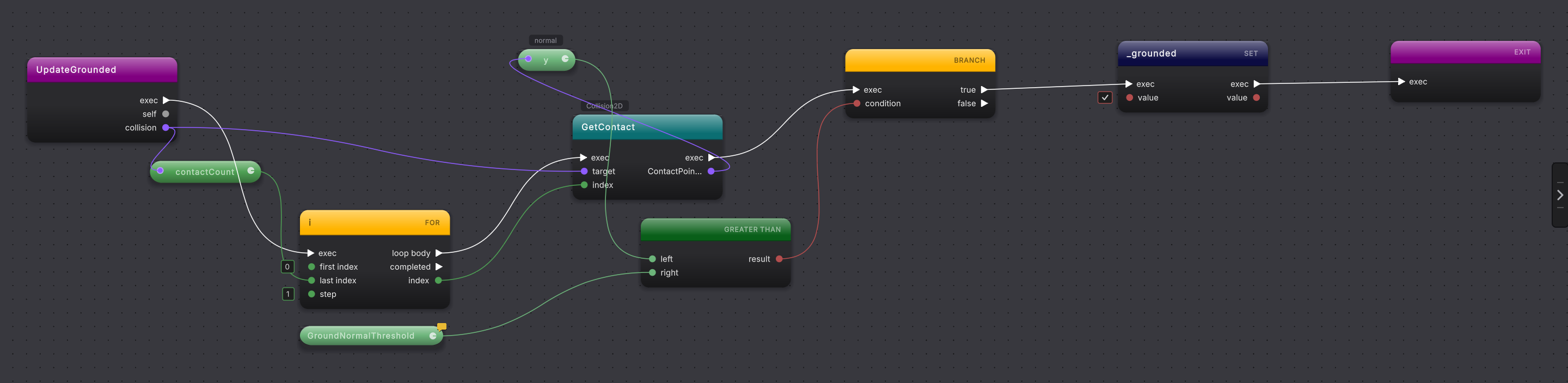
UpdateGrounded returns as soon as one contact marks the player grounded.Guide: Loops.
Switch
Section titled “Switch”Purpose. Switch routes one value into labeled arms. A switch statement is titled by its selector with SWITCH on the right; it continues through the chosen case and then leaves through the completed path. A switch expression produces a value instead and lists its arms as rows of a decision table.
| Pin | Direction | Type |
|---|---|---|
| exec | Input | exec, statement switch only |
| selection | Input | Switched value type |
| each case, and default | Output | exec, statement switch only |
| completed | Output | exec, statement switch only |
| result | Output | Inferred result type, switch expression only |
switch (CurrentState){    case EnemyState.Patrolling:        SetPatrolEnabled(true);        SetBodyColliderEnabled(true);        break;
    case EnemyState.Stunned:        SetPatrolEnabled(false);        break;
    case EnemyState.Defeated:        SetPatrolEnabled(false);        SetBodyColliderEnabled(false);        ApplyDefeatedVisual();        break;}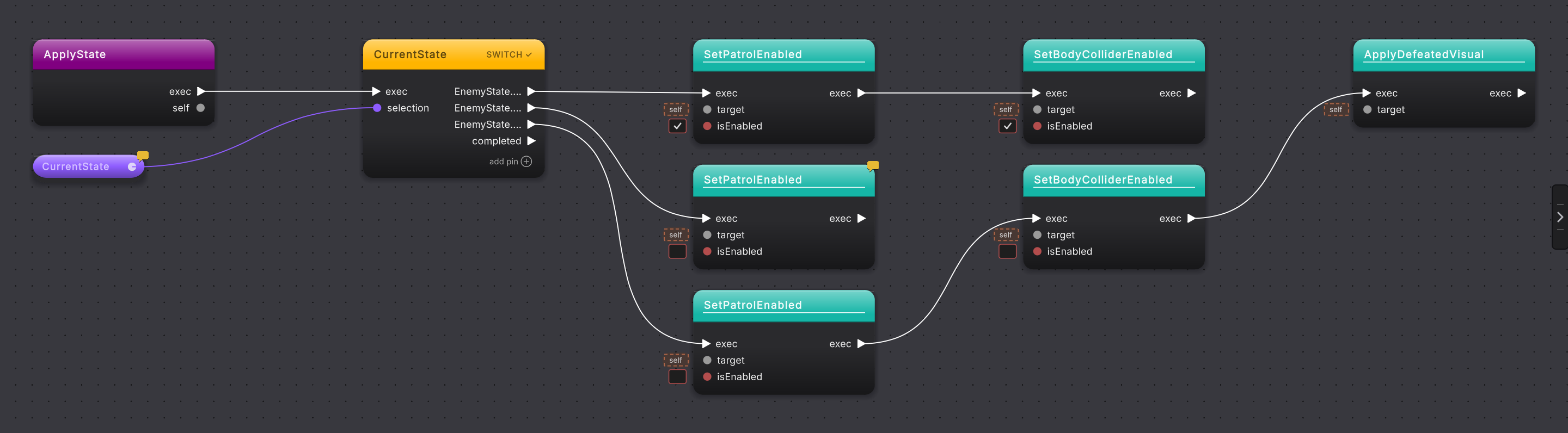
ApplyState switch exposes one arm for each EnemyState value.Guide: Switch.
Try catch
Section titled “Try catch”Purpose. Try catch keeps normal work, one or more exception handlers, an optional finally, and the continuation visible as one scope. Catch filters add a Boolean gate to a handler.
| Pin | Direction | Type |
|---|---|---|
| exec | Input | exec |
| try | Output | exec |
| each catch | Output | exec |
| exception | Output | Declared exception type, when named |
| finally | Output | exec, when present |
| completed | Output | exec |
try{ Save();}catch (IOException ex) when (ex.Message.Length > 0){ Report(ex);}finally{ Close();}Guide: Try, catch, and using.
Purpose. Using marks a using statement that owns a disposable resource for one scope. The node carries the resource declaration and stands in for the whole block; the statements inside it are not drawn, and Round Trip does not write one. await using has its own node with a resource input, an output named for the declared variable, and the body statements after it.
| Pin | Direction | Type |
|---|---|---|
| exec | Input | exec |
| exec | Output | exec, to the statement after the block |
using (var stream = OpenStream()){ Read(stream);}Guide: Try, catch, and using.
Placeholder
Section titled “Placeholder”Purpose. Placeholder marks a statement or expression the parser cannot represent safely. It is gray and keeps the source text or diagnostic visible. It is a stop sign, not an approximation.
| Pin | Direction | Type |
|---|---|---|
| exec | Input | exec, when the unsupported shape is a statement |
| exec | Output | exec, when flow can continue visibly |
| diagnostic value | Varies | wildcard when no safe type is known |
var query = from coin in coins where coin.IsCollected select coin;A method with a non-design placeholder refuses Compile. Fix the marked construct in C#, then press the reload icon in the top rail (tooltip: “Re-run the Round Trip parse, adapter, and render pipeline for the active method.”) and continue only after the placeholder is gone.
Guide: When it refuses.