
Switch
Route statements or values through switch cases, expression arms, defaults, and goto case paths.
On this page
An enemy has named states. A switch keeps the behavior for each state in one visible set of arms.
The problem
Section titled “The problem”EnemyStateMachine.ApplyState must turn patrol and collision behavior on or off for Patrolling, Stunned, and Defeated. A chain of bool conditions would repeat the same state read and make missing states harder to spot.
When to reach for it
Section titled “When to reach for it”Use a switch statement when one selector chooses a block of statements. Use a switch expression when one selector produces a value. A switch statement shows one output per case in source order, plus default when the source has one. A switch expression shows its arms as rows of a decision table, including a discard arm when the source has one.
A statement arm carries exec flow into its body. break finishes that case, and the completed output carries on to the statement after the switch. goto case and goto default connect explicitly to another case. A switch expression has arm conditions and result values, then one result output for the consuming node.
See it
Section titled “See it”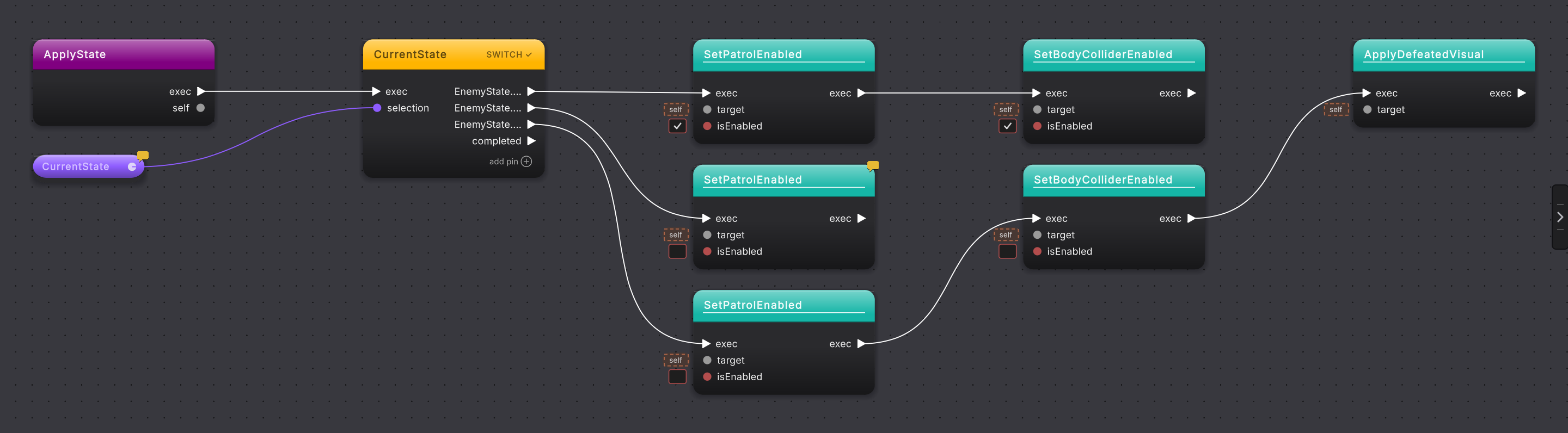
-
Open
EnemyStateMachine.ApplyStateand find the switch. Its title is the selector,CurrentState, with SWITCH on the right, and the selector’s data wire arrives on theselectionpin. -
Follow the Patrolling arm. It enables patrol and the body collider before its
breakends the case. -
Follow Stunned. It disables patrol and then leaves the switch.
-
Follow Defeated. It disables patrol, disables the body collider, and applies the defeated visual.
-
Right-click the switch and choose Edit Switch Cases to add a case, remove one, move it up or down, or make one the default. It works on a switch read from the file as well as one placed on the canvas.
-
To author a switch, add
switchorswitch expressionfrom the flow-control actions, connect the selector, define the cases or expression arms, and provide a default when unmatched values need an explicit path.
What it writes
Section titled “What it writes”A switch expression uses the same arm idea to produce a value, for example state switch { ... }. Its arm results feed one output instead of owning statement bodies.
When it goes wrong
Section titled “When it goes wrong”When it goes wrong
| Symptom | Check | Fix |
|---|---|---|
| A value has no visible path. | Look for a default case or a discard arm. Without one, an unmatched value runs no case and leaves through completed. | Add an explicit default when unmatched values need handling. |
| One case continues into another unexpectedly. | Read the case terminator and any goto case node. | Use break to finish the arm, or keep goto case only when the shared path is intentional. |
| An expression arm is hard to scan. | Read its row in the decision table: the pattern, any when guard, and the result. | Read one column at a time: every pattern first, then the guards, then the results. |
- Return and throw: see how switch arms terminate a method.
- Switch on a state: practice the Platformer state pattern.
- Enums and data classes: define the values a switch selects.