
Lifecycle methods
Add an available Unity lifecycle callback from the project catalog without typing its signature.
On this page
A patrol needs FixedUpdate; setup may need Awake; a temporary effect may clean up in OnDisable. Unity chooses when these methods run, so their names and signatures are contracts.
The problem
Section titled “The problem”Typing a lifecycle callback from memory is easy to get almost right. A misspelled method still compiles but Unity never invokes it.
When to reach for it
Section titled “When to reach for it”Use the Lifecycle section when the selected class needs a configured Unity callback it has not implemented. The picker is built from the project’s lifecycle definitions and recognized methods, so it offers signatures instead of free-text names.
Conditional callbacks, such as OnCollisionEnter2D, may be hidden when their component is absent everywhere the class is used. A class that is on no GameObject yet is offered every callback, so a script you are still writing can add its collision and trigger callbacks. A class that names the component itself, with [RequireComponent(typeof(Rigidbody2D))] or a member that takes or returns one, keeps that component’s callbacks whatever the scenes say. Rows that cannot be added stay disabled with a reason.
See it
Section titled “See it”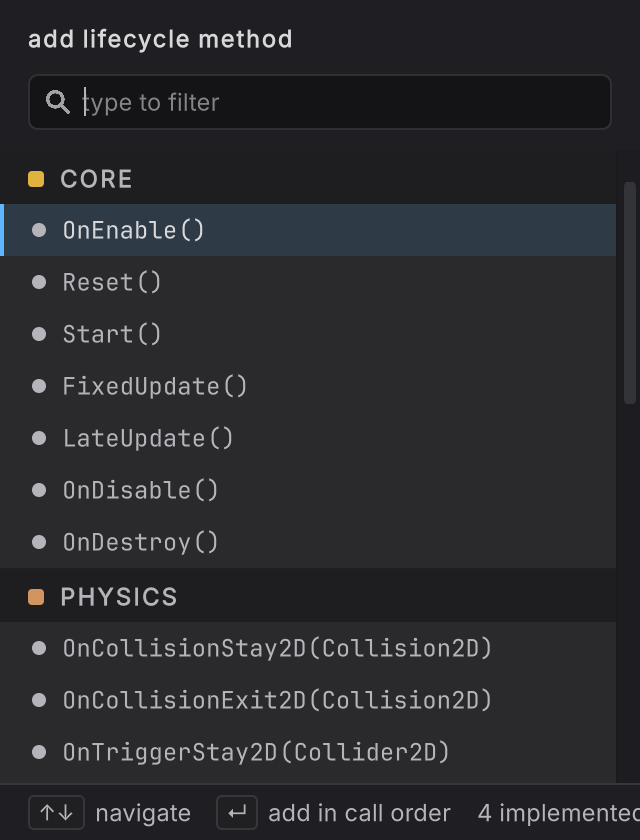
- Select a class in the Explorer and open its Lifecycle section.
- Choose the add action. The add lifecycle method picker opens.
- Type into type to filter or move with Up and Down. The picker groups callbacks by configured phase and keeps their source-cased names.
- Read the signature summary and any origin chip. Disabled rows explain configuration or availability conflicts.
- Press Enter on an available callback. Round Trip uses the configured signature, access, scope, and body form.
- Open the new callback graph and add its behavior.
- Return to the identity header if you want to inspect its name. Lifecycle names are read-only. The tooltip says
lifecycle method names are locked: the name is the contract the engine invokes. - When nothing remains to add, the picker shows every lifecycle method is implemented instead of an empty list.
What it writes
Section titled “What it writes”The exact declaration comes from the project’s lifecycle catalog. Round Trip does not invent a fallback signature when that configuration is missing or invalid.
When it goes wrong
Section titled “When it goes wrong”When it goes wrong
| Symptom | Check | Fix |
|---|---|---|
| The picker shows no callbacks | Read whether it says every lifecycle method is implemented or reports invalid definitions. | If all are implemented, no action is needed. Otherwise repair the lifecycle settings. |
| A callback is hidden | Read the picker footer for the hidden count. The class is on a GameObject that lacks the matching component. | Add the required component where the class is used, or add a RequireComponent attribute for it to the class, then reopen the picker. |
| F2 does not rename the method | Confirm the identity is a lifecycle method. | Keep the configured lifecycle name. Create an ordinary method for a freely named operation. |