
Loops
Read for, foreach, while, and do-while nodes, including indexes, completion, break, and continue.
On this page
A player can touch a surface through more than one contact point. The loop checks each contact until one has a strong upward-facing normal.
The problem
Section titled “The problem”PlayerMotor.UpdateGrounded cannot assume contact zero represents the floor. It scans each contact, marks the player grounded when a normal points up past the threshold, then returns early.
When to reach for it
Section titled “When to reach for it”Use for when an index and numeric bounds matter. Use foreach when the current element matters more than its position. Use while when the condition must pass before the first body run. Use do-while when the body must run once before the condition is checked.
Loop nodes expose exec outputs for loop body and completed. A for node is titled by its loop variable, with FOR on the right, and also exposes its index value. A foreach node exposes the current element and an array index. break exits to completion; continue skips the remaining body and starts the next iteration.
See it
Section titled “See it”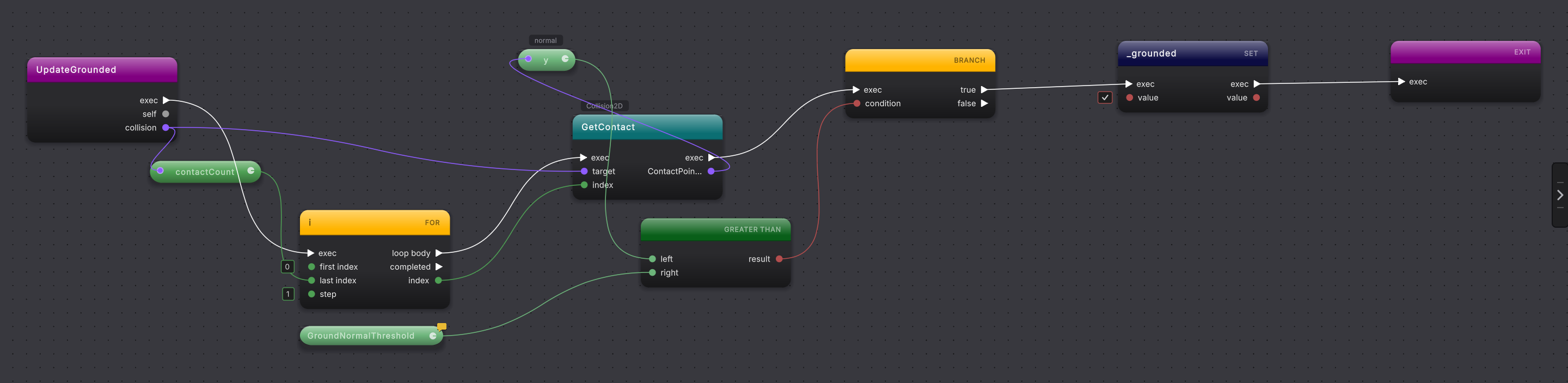
-
Open
PlayerMotor.UpdateGroundedand follow execution to thefornode. -
Read the range pins. The node is titled
iwith FOR on the right. The source countsifrom zero while it is belowcollision.contactCount, one step at a time, so the loop reads as a range:first indexholds0,stepholds1, andcollision.contactCountis wired intolast index. -
Follow
loop body. Thecollision.GetContact(i)call runs first on each pass, then a branch compares that contact’s vertical normal withGroundNormalThreshold. The normal arrives as one Get pill,ywithnormalabove it, on the call’s return wire. -
Follow the true branch. It sets
_groundedtotrue, then returns before any remaining contacts are checked. -
Inspect the for loop type row in the right rail. It switches between From To and C-Style; the C-Style view moves the
last indexwire to theconditionpin and back. The choice is stored as a for-loop type override in.rt.json, so the chosen presentation can return without changing the C# header by itself. -
For another loop form, add
for,foreach,while, ordo whilefrom the flow-control actions. Connect body work and the completed continuation before Compile. A value wired intofirst indexorlast indexis written as that bound, and typing a number over a wired bound replaces the wire.
What it writes
Section titled “What it writes”The nodes the loop body wire reaches become the block, including a loop from the file whose body wire you rewired. The completed wire points to the next statement after it. A break writes an early exit from the enclosing loop; continue writes a jump to its next iteration.
When it goes wrong
Section titled “When it goes wrong”When it goes wrong
| Symptom | Check | Fix |
|---|---|---|
| Work that should run once repeats. | See whether it is connected to loop body instead of completed. | Move the post-loop statement to the completed output. |
| A for loop shows a C-style header instead of range pins. | The parser uses range pins only for one variable counted by a fixed numeric step toward a number or a value, such as i < items.Length. | Read the preserved header, or change only the visual type view if that presentation is clearer. |
| Break or continue affects the wrong loop. | Trace its enclosing loop and nesting depth. | Place the node inside the intended loop body before Compile. |
- Branch: understand the comparison inside the loop body.
- Switch: route one value among several named paths.
- Scan a list: practice the Platformer contact scan shape.