
Properties: Variables or Methods?
Properties normally belong under Variables. See why getters and setters with behavior appear under Methods, with GameMaster screenshots and short C# examples.
On this page
Properties normally belong under Variables. A property that holds a value, or simply exposes a backing field, belongs with the class’s stored values. Only when a property has behavior (calculating an answer, checking a value, creating something, or calling other work) does Round Trip put it under Methods so you can inspect that behavior.
It is still a C# property. Its location in the left rail does not change how another part of your code uses it.
The normal case: a stored value
Section titled “The normal case: a stored value”These small, fictional examples belong under Variables, not Methods:
public int Score { get; set; }
private int _ammo;public int Ammo{    get => _ammo;    set => _ammo = value;}
Score uses automatic storage. Ammo simply reads and writes its backing field. Having a getter and a setter is not the reason to put a property in Methods. A read-only property that simply returns its backing field also belongs under Variables.
When Round Trip can identify one matching backing field for a property, the property has a Storage child describing that field; an auto-property uses <auto> storage. The property and its backing field are one variable: the field appears only under the property’s caret, not as a row of its own. If two properties share a field, or the storage cannot be matched confidently, Round Trip keeps the property and field separate rather than guessing. That alone does not move a property to Methods.
Spot the exceptions in GameMaster
Section titled “Spot the exceptions in GameMaster”God Complex’s GameMaster provides several real examples. These screenshots show the same editor state: the second slide is a close-up. It is not an edit or a before-and-after comparison. Only short, relevant source excerpts appear below; you do not need the God Complex project to follow the rule.
Find the properties with behavior in GameMaster
Select a screenshot to enlarge it.
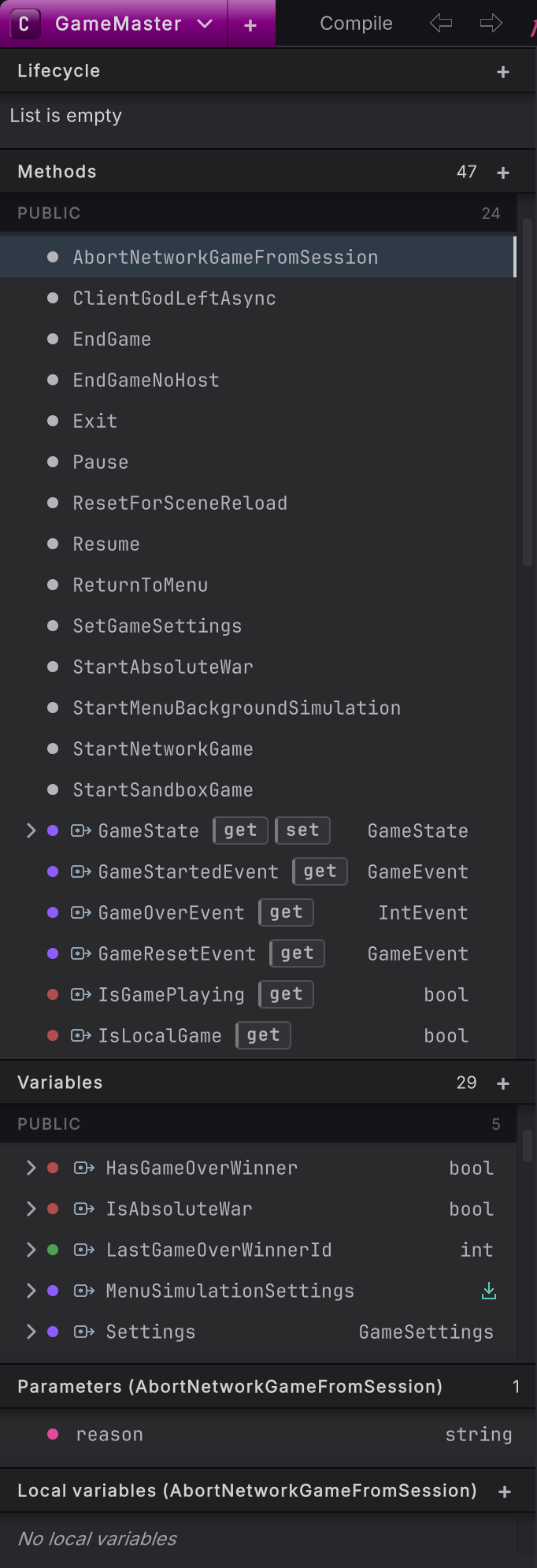
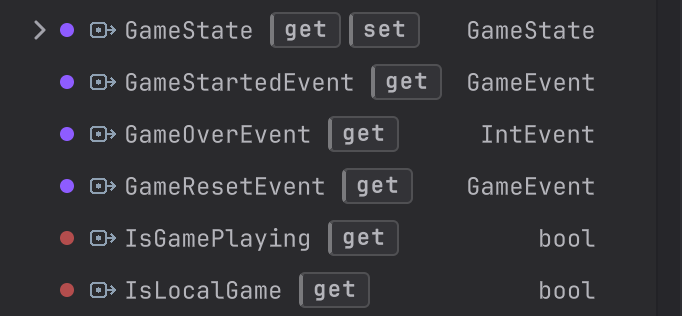
A computed getter behaves like a small method
Section titled “A computed getter behaves like a small method”This one-line excerpt from GameMaster answers a question about the current state:
public bool IsLocalGame => GameState is GameState.LocalGame or GameState.Sandbox or GameState.PreGameMenu;The getter evaluates a pattern every time it is read rather than returning a stored boolean, so IsLocalGame appears under Methods with a get chip. IsGamePlaying similarly checks whether the current state is one of the playing states.
A calculation does not need to change anything to count as behavior. In a fictional health component, public bool IsAlive => _health > 0; also belongs under Methods. By contrast, public bool IsAlive => _isAlive; simply exposes a field and belongs under Variables. The arrow syntax is the same; the expression is what matters.
One behavior-bearing setter moves the whole property
Section titled “One behavior-bearing setter moves the whole property”This is the relevant GameState property excerpt, with its Inspector attribute omitted:
public GameState GameState{ get => State; private set { SetState(value); LogTrace($"#### GameState set to {value}"); }}The setter changes the state through SetState and writes a trace. It is not a plain assignment to a backing field. Round Trip therefore puts the whole property under Methods, including its simple getter, instead of splitting one property across both sections.
The get and set chips name the accessors: the code used to read and write the property. They do not grant access: this setter remains private, even though the property group is under PUBLIC.
A getter can create something, too
Section titled “A getter can create something, too”GameStartedEvent, GameOverEvent, and GameResetEvent check whether their event object already exists and create it if needed. That work is why their get rows appear under Methods, not because their names end in Event.
Here is the same idea with a fictional example, not more GameMaster source:
private List<string> _messages;public List<string> Messages{ get { if (_messages == null) _messages = new List<string>(); return _messages; }}Reading Messages can allocate and store a list. Messages is behavior under Methods; _messages is still storage under Variables. That is not a duplicate property: one row opens the accessor’s work, the other represents the field it uses.
Open the behavior, or use the value
Section titled “Open the behavior, or use the value”- For a getter-only row such as IsLocalGame, open the row to inspect its getter diagram. There is no pair to expand.
- For GameState, use the caret or right-click Expand Accessors, then open get or set. Right-click an accessor and choose View in Source to inspect its C#.
- Opening an accessor is different from reading the property’s value in another method. The read still uses normal property syntax, such as
bool local = IsLocalGame;, notIsLocalGame(). - Merely expanding or opening these rows does not rewrite the source. If you change an accessor’s code from plain storage to behavior, its rail placement can change when Round Trip reads the updated source.
- The window: identify the four main left-rail sections.
- Classes and members: navigate access groups, overloaded methods, and accessor groups.
- Variables: drag stored values onto the canvas as GET pills or SET nodes.
- Get and set: distinguish using a property’s value from inspecting its implementation.