
What ships
The four Round Trip packages, what each contains, and how the compiled assemblies and the source package relate.
On this page
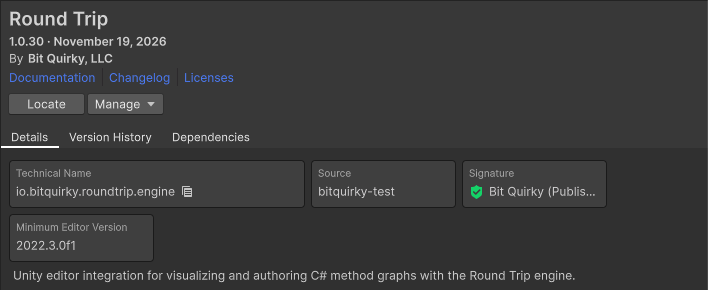
Round Trip is one Asset Store product delivered as four Unity packages. Package Manager installs and removes each one; nothing is copied into your Assets folder and no installer runs.
The four packages
Section titled “The four packages”| Package | Technical name | You install it | Contents |
|---|---|---|---|
| Round Trip | io.bitquirky.roundtrip.engine |
always | the tool: its compiled assemblies under Plugins/ and the editor integration |
| graph canvas | io.bitquirky.roundtrip.graph |
never; it is a dependency and arrives with Round Trip | the compiled node canvas Round Trip draws with |
| Round Trip Sample - Platformer | io.bitquirky.roundtrip.platformer |
when you want the sample game | the Platformer sample under its Samples tab; depends on Round Trip, the Input System and uGUI |
| Round Trip Source | io.bitquirky.roundtrip.source |
when you want the C# | the C# of the Unity editor integration and the graph canvas; the model, engine and third-party libraries stay compiled |
Every package in a release carries the same version number, and each CHANGELOG.md opens with that version. The sample and source packages are part of the purchase; they are optional only in the sense that you choose whether to install them.
Compiled by default
Section titled “Compiled by default”With only Round Trip installed, every Round Trip assembly is a compiled plugin. Each ships in three builds, one per Unity line, and Unity picks the right one by define constraint:
| Folder | Loaded on |
|---|---|
Plugins/2022.3/ |
Unity 2022.3 up to 6000.2 |
Plugins/6000.3/ |
Unity 6000.3 and 6000.4 |
Plugins/6000.5/ |
Unity 6000.5 and later |
Assemblies that do not depend on the Unity version ship once under Plugins/Portable/. The Round Trip model and engine (RoundTrip.Core, RoundTrip.Engine), the parser and source writer (Roslyn), the graph layout (MSAGL) and their supporting libraries ship once under Runtime/Plugins/. Round Trip adds nothing to a player build; the C# it writes is ordinary C# in your project.
Source when you want it
Section titled “Source when you want it”Installing Round Trip Source adds the scripting define BITQUIRKY_GRAPH_LOCAL to the project. The compiled assemblies carry the constraint !BITQUIRKY_GRAPH_LOCAL and the source assemblies carry BITQUIRKY_GRAPH_LOCAL, so the define alone decides which set Unity compiles. After the recompile, the same assembly names exist, built from the package’s C#: breakpoints, Find Usages and local edits work as they do in your own scripts.
Removing the source package clears the define and the compiled assemblies return. Project settings, indexed folders and layout files are untouched in both directions. The source package holds the editor integration and canvas C# with the original SVG artwork for the icons. RoundTrip.Core, RoundTrip.Engine, Roslyn and MSAGL are not part of it and stay compiled in either mode.
Layers
Section titled “Layers”The lower layers, the model and the engine that parse and write C#, contain no Unity types. Unity-specific indexing, settings, object references, menus, controls and window behavior sit above that boundary in the editor assemblies. Architecture describes the layers; Supported C# lists what the engine reads and writes.