
Variables
Create GET and SET nodes from fields, properties, and locals in the Variables rail.
On this page
A variable row is both an inventory and a handle. Read it with GET, write it with SET, or drag it straight to the place where the value matters.
The problem
Section titled “The problem”PlayerController has scene references, injected collaborators, local values, and state. Searching a general action menu for each one adds friction and makes it easy to pick a similarly named member from the wrong type.
When to reach for it
Section titled “When to reach for it”Use the Variables section when the value already belongs to the active class or method. The rail lists class fields and local variables in context. Property rows respect whether a getter or setter exists. Instance members are unavailable from a static method because there is no instance to read or write.
See it
Section titled “See it”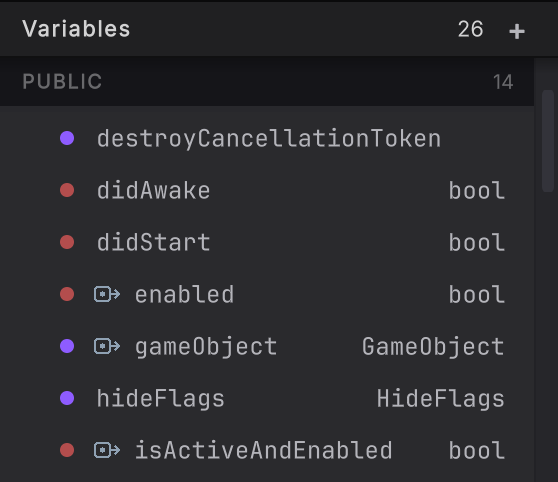
-
Open
PlayerControllerand choose a method. Expand the Variables section in the left rail. Fields sit under Variables and the method’s locals under Local Variables; each header’s + adds a new one. -
Right-click a readable row and choose Create Get Node. A compact GET pill appears on the active graph.
-
Right-click a writable row and choose Create Set Node. The new card has exec pins because writing a value is a statement.
-
Drag a variable row onto empty canvas. After the drag crosses its threshold and reaches the canvas, choose get or set with the variable’s name from the choice menu, for example
get _direction. Read-only properties offer get only. -
Place a GET near the card that consumes it and connect its output to a compatible data input. Place a SET on the exec path and connect the value to write.
-
Use Cmd/Ctrl+Z to undo the creation if you chose the wrong form. The variable row remains in the rail because it comes from the active class or method.
What it writes
Section titled “What it writes”GET supplies an expression to another node. SET creates an assignment on the exec path. A property SET uses the property face only when the property is writable.
When it goes wrong
Section titled “When it goes wrong”When it goes wrong
| Symptom | Check | Fix |
|---|---|---|
| Create Set Node is disabled. | Check whether the row is a read-only property, constant, or otherwise not writable. | Create a GET, or choose a member whose source declaration permits assignment. |
| Dragging a field from a static method does nothing. | Check whether the field is an instance member. | Use a static member or work from an instance method with a valid receiver. |
| The dropped variable menu offers the wrong scope. | Confirm the active method and class before starting the drag. | Open the intended method, then drag from its refreshed Variables rail. |
- Pills and literals: understand how GET values sit on the canvas.
- Get and set: connect variables into source-writing patterns.
- Preview and Compile: write the new assignment to C#.