
New class and method
Draft a source-backed type and its first method, preview the graph, then Compile.
On this page
A new door behavior needs a home before it needs nodes. Start with the type, then give it one small method.
The problem
Section titled “The problem”Creating a C# file by hand asks for several decisions at once: folder, namespace, type kind, access, parent, method name, return type, and parameters. A typo in any one can leave the project compiling badly.
When to reach for it
Section titled “When to reach for it”Use Assets > Round Trip > New Class when no suitable type owns the behavior. The + beside the class chip at the top of the Round Trip Graphs window opens the same choices in place. Use Assets > Round Trip > New Method, or the + on the Methods section header, when the class exists and needs a new operation. Both flows validate identifiers and types before the declaration reaches source.
See it
Section titled “See it”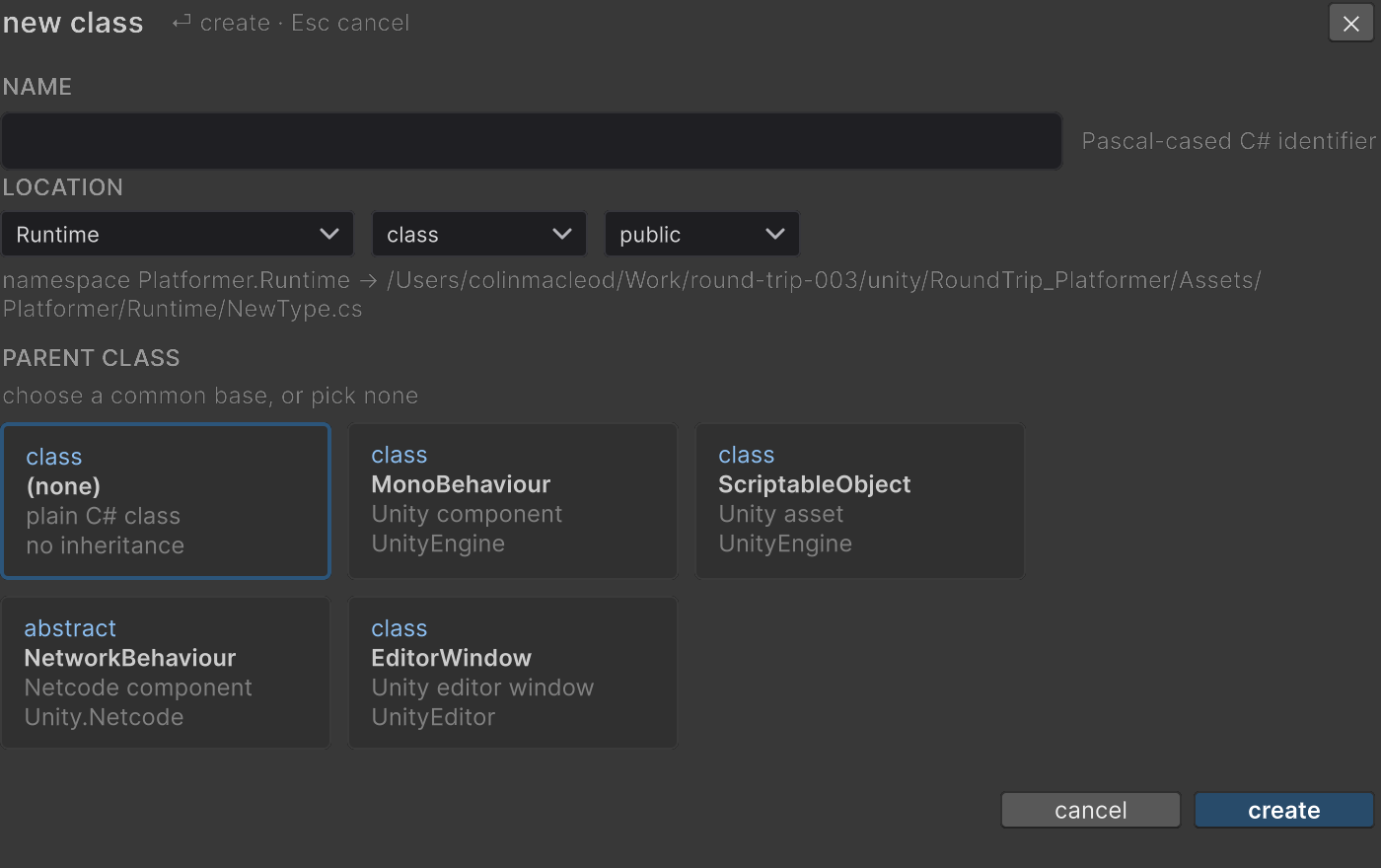
- Select the target folder in Unity’s Project window and choose Assets > Round Trip > New Class, or press the + beside the class chip in the Round Trip Graphs window.
- In NAME, enter a Pascal-cased C# identifier. The field shows a local reason for empty, invalid, reserved, or colliding names.
- In LOCATION, choose a registered source folder. The namespace and resolved path follow that location. In the window’s create dialog, New Folder… makes a folder that does not exist yet.
- Choose
class,struct,interface, orenum, then choosepublicorinternalaccess. - In PARENT CLASS, pick (none) or a base card.
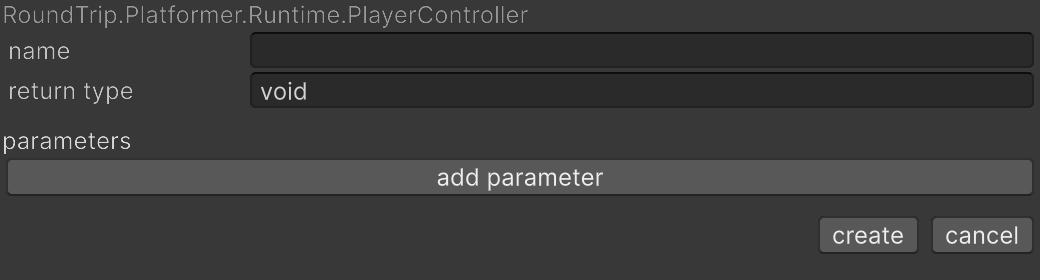
MonoBehaviourandScriptableObjectare always offered, whichever bases the project already uses. In the window’s create dialog, OR BROWSE ALL CLASSES lists every indexed class as another base. An enum has no parent, so it disables the parent choices. - Create the draft, select the new type, and choose Assets > Round Trip > New Method. In the Graphs window you can press the + on the Methods section header instead: it adds a
voidmethod namedNewMethod(or the next free name), opens its preview graph, and puts a name box on its row. Type the name and press Enter, or press Escape to keep the default. The box stays open while the preview graph loads. - Enter the method
nameandreturn type. Underparameters, choose add parameter for each type and name pair. - Choose create to open the preview graph, or cancel to leave without a draft.
- Add behavior to the preview graph. No class or method source is written while you are still arranging the draft.
- Press Compile. The declarations and body are written, Unity imports the file, and the parsed method graph replaces the preview.
What it writes
Section titled “What it writes”The parent you chose brings its using with it. Any type name Compile writes in full, such as UnityEngine.Debug, is shortened and its namespace imported wherever that cannot make a name in the file ambiguous.
When it goes wrong
Section titled “When it goes wrong”When it goes wrong
| Symptom | Check | Fix |
|---|---|---|
| Create stays blocked | Read the name callout and resolved path. | Use a valid, unused C# identifier and an existing registered folder. |
| A parameter is rejected | Check its type expression and name. | Use a valid C# type, a unique identifier, and never void as a parameter type. |
| The preview has no source location | Confirm the method is still a draft. | Finish the graph and press Compile to create its source span. |