
Branch
Read and author if, else if, and else as condition-driven execution paths.
On this page
A patrol reaches its left bound or its right bound. A branch decides whether the enemy turns, keeps going, or checks the other side.
The problem
Section titled “The problem”EnemyPatrol.FixedUpdate must reverse only when the enemy has reached a bound and is still moving farther past it. Two independent checks could both run in one update. The source uses if followed by else if, so the second condition is considered only when the first is false.
When to reach for it
Section titled “When to reach for it”Use a branch when one bool decides which path runs. Add an else if when another condition should be tested only after the first fails. Add else when every remaining case needs a path.
A branch node is titled BRANCH and has a bool condition data pin and named true and false exec outputs. A chained else if is another branch on the false path. Statements after the whole shape continue where the paths rejoin.
See it
Section titled “See it”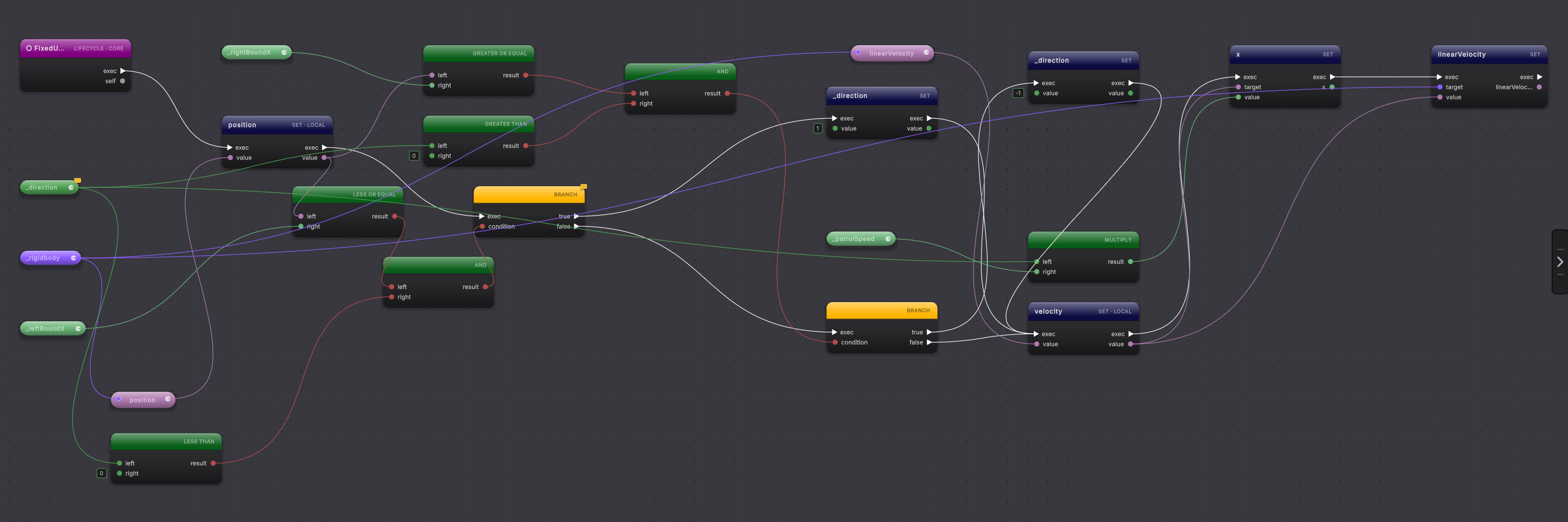
-
Open
EnemyPatrol.FixedUpdateand start at the entry node. -
Follow the exec wire to the first branch. Trace the bool data wire into
condition; it combines the left-bound comparison with the current direction. -
Follow
true. The SET node changes_directionto1, then execution rejoins the velocity work. -
Return to the first branch and follow
false. It reaches theelse ifbranch, where the right-bound and positive-direction checks feed a secondconditionpin. -
Follow the second
trueoutput to the SET that writes-1. Follow its false path to see that neither assignment runs. -
To author the shape, place a
branchfrom the flow-control actions, wire a bool intocondition, and connect statement nodes to its true and false outputs. The comparison and logical rows under operators, such as Less Than and And, each produce a bool for the condition. Right-click the branch and choose Edit Branch Arms when you need to add, remove, or reorder its arms. -
A node you drag from
trueis written once, inside theif. A statement already in the file that you wire onto an arm of a branch you placed moves into that arm when you choose Compile.
What it writes
Section titled “What it writes”The branch condition comes from the condition pin. Statements connected to true become the if body; statements connected to false become else or the next else if branch.
When it goes wrong
Section titled “When it goes wrong”When it goes wrong
| Symptom | Check | Fix |
|---|---|---|
| Both pieces of work run. | Check whether the second branch sits after the first branch instead of on its false output. | Connect the second test to false to produce else if. |
| The branch has no meaningful condition. | Look for a hollow condition pin or an invalid inline bool. | Connect a bool expression or enter an eligible bool literal. |
| A path appears to stop after an empty arm. | Inspect the true and false exec outputs and the continuation after the branch. | Connect the intended arm or leave it empty only when falling through is the intended C# shape. |
- Loops: repeat a branch body over contacts or collections.
- Return and throw: turn a branch into an early guard.
- Guard clause: use the common early-exit shape.