
Switch on a state
Read one switch arm per enemy state and see exactly which calls each state makes.
On this page
Patrolling, stunned, and defeated are three different answers to one question: what should this enemy do in its current state?
The problem
Section titled “The problem”An enemy state change must update several components together. A growing chain of conditions can obscure which calls belong to which state. EnemyStateMachine.ApplyState puts each answer in a named switch arm.
When to reach for it
Section titled “When to reach for it”- One enum selects among several distinct behaviors.
- Each known state owns a short sequence of calls.
- Adding a state should create a visible place to implement it.
See it
Section titled “See it”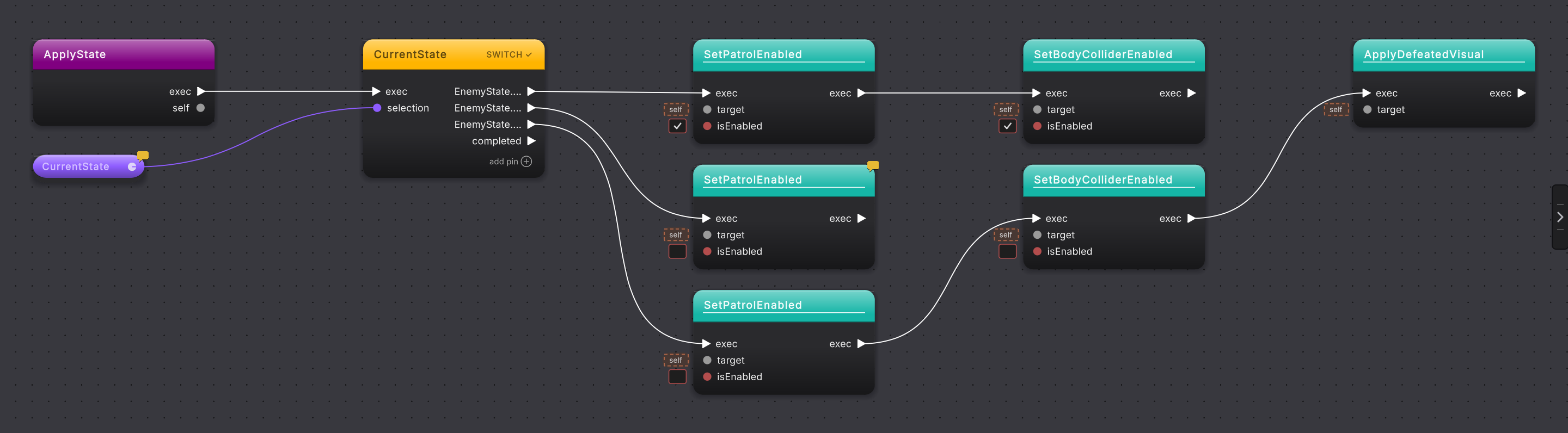
EnemyState value.The current Platformer source is:
private void ApplyState(){    switch (CurrentState)    {        case EnemyState.Patrolling:            SetPatrolEnabled(true);            SetBodyColliderEnabled(true);            break;
        case EnemyState.Stunned:            // Reserved hook (R6): movement and harm are off, but the enemy is still present.            SetPatrolEnabled(false);            break;
case EnemyState.Defeated: SetPatrolEnabled(false); SetBodyColliderEnabled(false); ApplyDefeatedVisual(); break; }}-
Open
EnemyStateMachine.ApplyStatein Graph View. -
Find the switch node and read its selector. The
CurrentStatepill feeds anEnemyStatevalue into the switch. -
Follow the
Patrollingarm. It enables patrol and the body collider, then stops at the arm’s break. -
Follow
Stunned. It disables patrol and leaves the enemy present. This arm has one call in the current sample. -
Follow
Defeated. It disables patrol, disables the body collider, and applies the defeated visual before breaking. -
Compare the arms side by side. The switch chooses one arm for the current value; execution does not fall through into the next arm.
What it writes
Section titled “What it writes”Adding one more step to the Stunned arm, for example disabling the body collider while stunned, changes only that case:
An entirely new enum value would need its own switch arm. Keep that arm complete so the graph does not suggest that another case will finish its work.
When it goes wrong
Section titled “When it goes wrong”When it goes wrong
| Symptom | Check | Fix |
|---|---|---|
| Two states appear to run in sequence. | Look for the break at the end of each switch arm. | End each independent arm before the next case begins. |
| A new enum value has no visible behavior. | Compare EnemyState values with the switch arm labels. | Add an arm for the new state and connect its state-specific calls. |
| Defeated enemies still collide. | Follow the Defeated arm to SetBodyColliderEnabled. | Keep the false literal on that call in the Defeated arm. |
- Switch: add and read switch arms.
- Enums and data classes: understand the value that selects an arm.
- Method calls: inspect the component-setting calls inside each state.