
Count and threshold
Follow a coin total through a rule call and a branch that opens the goal.
On this page
A coin count becomes useful when it crosses a line. ScoreCounter.OnCoinCountChanged asks one rule for that answer, updates the HUD, then acts only when the answer is true.
The problem
Section titled “The problem”The score service knows how many coins have been collected. The goal door and HUD need a stable answer about whether that count is enough, including the case where the door is already open.
When to reach for it
Section titled “When to reach for it”- A running total triggers work at a configured value.
- One pure calculation should feed both presentation and control flow.
- The decision belongs in a named rule that can be read independently.
See it
Section titled “See it”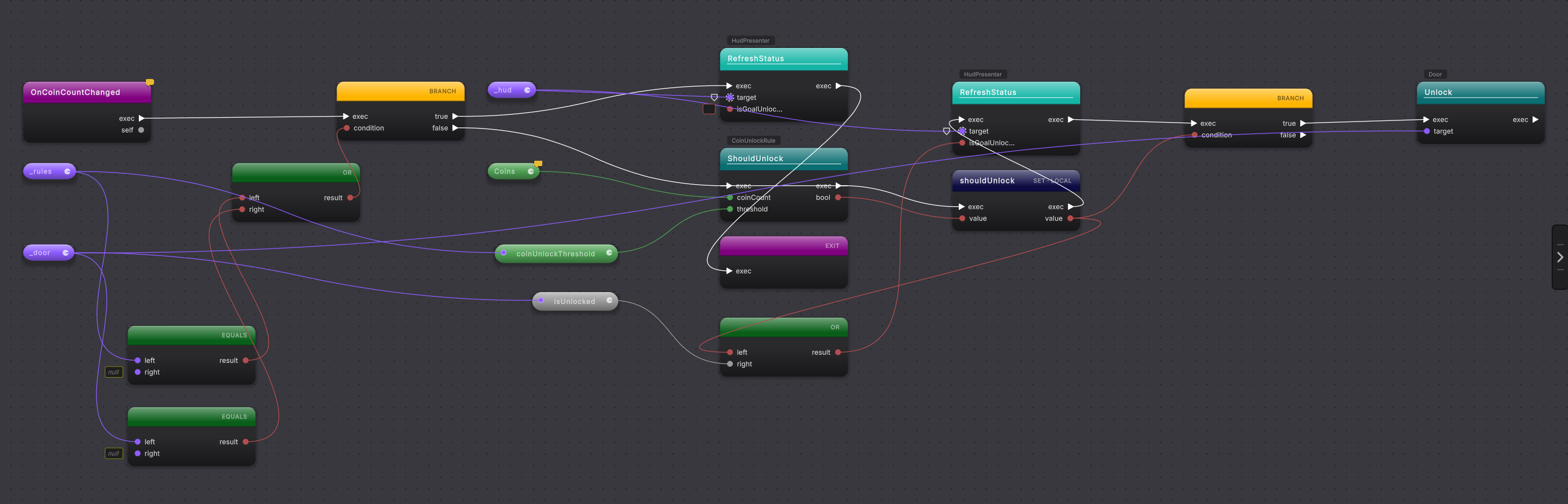
shouldUnlock result feeds the HUD expression and the final branch.The current Platformer source is:
public void OnCoinCountChanged(){    if (_rules == null || _door == null)    {        _hud?.RefreshStatus(isGoalUnlocked: false);        return;    }
    var shouldUnlock = CoinUnlockRule.ShouldUnlock(Coins, _rules.coinUnlockThreshold);    _hud?.RefreshStatus(shouldUnlock || _door.IsUnlocked);
if (shouldUnlock) { _door.Unlock(); }}-
Open
ScoreCounter.OnCoinCountChangedin Graph View. -
Follow the missing-reference guard first. If
_rulesor_dooris null, the HUD receivesfalseand the method returns. -
On the continuing route, read the two inputs to
CoinUnlockRule.ShouldUnlock: theCoinsproperty and_rules.coinUnlockThreshold. -
Follow the returned Boolean into the local
shouldUnlock. That one result fans out to two consumers. -
Read the HUD call. Its argument is
shouldUnlock || _door.IsUnlocked, so an already-open door stays shown as open even if this refresh does not newly cross the threshold. -
Read the final branch. Only the true output calls
_door.Unlock(); false reaches the end without a door call.
What it writes
Section titled “What it writes”Adding one more step to the true route, such as a diagnostic after the door call, extends only that branch:
The calculation and HUD call stay where they are. The added call runs only when shouldUnlock is true.
When it goes wrong
Section titled “When it goes wrong”When it goes wrong
| Symptom | Check | Fix |
|---|---|---|
| The door call runs before the threshold is met. | Follow the exec input to the door call. | Keep it on the true output of the threshold-result branch. |
| The HUD says closed after the door is already open. | Read whether the HUD input includes the door's existing state. | Feed the existing door state into the HUD expression with the threshold result. |
| The graph repeats the threshold calculation. | Count calls to the threshold rule. | Store the result once and fan its data wire to each consumer. |
- Branch: route a Boolean result.
- Operators and expressions: read the HUD’s Boolean expression.
- Method calls: follow arguments into the rule and door.