
Check what the AI did
Review an assistant's source edit as a graph, compare it with HEAD, and keep or revert one method.
On this page
An assistant changed enemy stomping. Before you keep the edit, answer three concrete questions from the graph: what does it call, what does it change, and where can it return early?
The problem
Section titled “The problem”A generated patch can be valid C# and still express the wrong game rule. PlayerController.StompEnemy is a useful review example because it starts with a guard, changes the enemy, awards score inside a branch, and contains a nested HUD branch with a warning path.
When to reach for it
Section titled “When to reach for it”- An AI assistant edited gameplay code and you need the shape before the syntax.
- A diff is large enough that the control flow is hard to hold in your head.
- You want to reject one changed method without treating the whole class as one decision.
See it
Section titled “See it”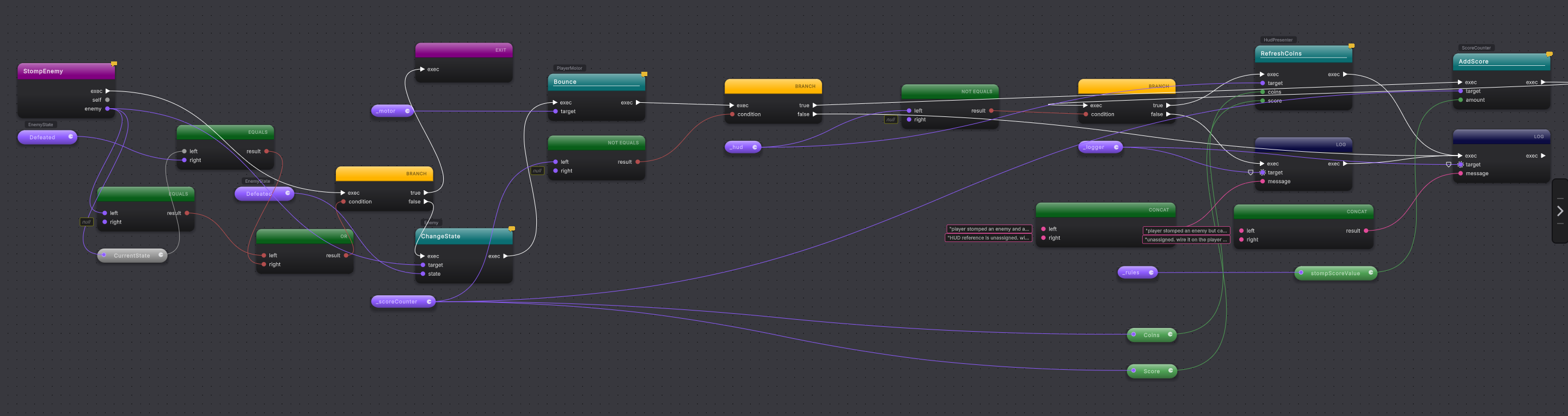
-
Let Unity finish importing the assistant’s
.cschanges, then open Tools > Round Trip > Graph View. Round Trip indexes and parses the current source; the assistant’s edit is already source, not a graph draft. -
Find the modified-classes button on the top rail; its tooltip reads Show modified classes. It is enabled only when version control is detected. Open it to see modified, added, and renamed classes, then choose
PlayerController. -
Select
StompEnemy. Right-click its method row and choose Diff against HEAD. This comparison is disabled on a clean method and available on a changed one. -
Read the baseline and current method in the diff. Write down the new call, branch, or value before returning to the graph. The diff tells you what moved; the graph tells you what that move controls.
-
Start at the entry node and ask: What does it call? In the current sample, the method calls
enemy.ChangeState,_motor.Bounce,_scoreCounter.AddScore,_hud.RefreshCoins, and warning methods on_logger. -
Ask: What does it change? The enemy enters
Defeated; the motor bounces; score can increase; the HUD can refresh. Calls on warning routes report missing scene references without changing those gameplay values. -
Ask: Where does it return early? The first guard returns when
enemyis null or already defeated. Follow that true output to the return node. No bounce or score call should sit before that return. -
Read the nested branch. The outer branch checks
_scoreCounter. Its true route awards score, then the inner branch checks_hud. The inner true route refreshes the HUD; its false route logs a warning. The outer false route logs a different warning. -
Compare the new graph shape with the three answers. If the edit matches the intended rule, keep the source as it is. No acceptance button is needed because the changed C# is already the source of truth.
-
If the method is wrong, right-click it and choose Revert Method. The action is enabled for modified, added, or renamed methods when version control is available. It restores that method from the configured baseline.
A small review card
Section titled “A small review card”Keep these questions beside the graph:
- What does it call? Read every impure call on each exec route.
- What does it change? Include assignments and calls whose names imply state changes, then confirm in source.
- Where does it return early? Start from every return node and trace backward to its branch condition.
A fourth question helps with nested branches: which calls happen only when both conditions are true? In StompEnemy, the HUD refresh needs both _scoreCounter and _hud.
When it goes wrong
Section titled “When it goes wrong”When it goes wrong
| Symptom | Check | Fix |
|---|---|---|
| The modified-classes button is disabled. | Read its disabled tooltip: No version control detected. | Open the changed class directly and review its graph; history actions need a detected provider. |
| Diff against HEAD is disabled. | Confirm the selected method has a changed status instead of Clean. | Choose the changed method row shown under the class in the modified-classes list. |
| The graph still shows the older method. | Confirm Unity has finished compiling and importing the assistant edit. | Use Reload on the active method after the editor is ready. |
| Revert Method would remove another wanted edit. | Read Diff against HEAD for the whole method first. | Do not use Revert Method when you intend to keep another change in that same method. |
- Work as a team: make review and Compile ownership explicit.
- Changes and history: understand the status actions on each method.
- Branch: trace nested true and false routes.