
Work as a team
Share C# and project settings while each teammate keeps a personal Round Trip canvas layout by default.
On this page
A designer changes a call on the canvas. A programmer renames the called method in C#. Both should meet in the same source file, without fighting over where somebody parked a node.
The problem
Section titled “The problem”Teams need a clear boundary between shared game behavior and personal editor arrangement. Round Trip keeps behavior in .cs files. Project indexing settings are shared. Canvas layout can stay local unless the team deliberately chooses to share it.
When to reach for it
Section titled “When to reach for it”- Designers and programmers edit the same gameplay classes through different surfaces.
- One teammate reads graphs while another reads C#.
- You need to decide which Round Trip files belong to the project and which belong to one machine.
What each teammate installs
Section titled “What each teammate installs”Round Trip is a Unity package in the project, so everyone opening that project receives the same package dependency. A designer opens Graph View and works on the canvas. A programmer can edit the same .cs files in their usual editor and open Graph View whenever a visual check helps. Both roles exchange the same C#.
Every teammate uses a Unity version supported by the project and lets Unity finish package resolution and script compilation before opening a graph.
See it
Section titled “See it”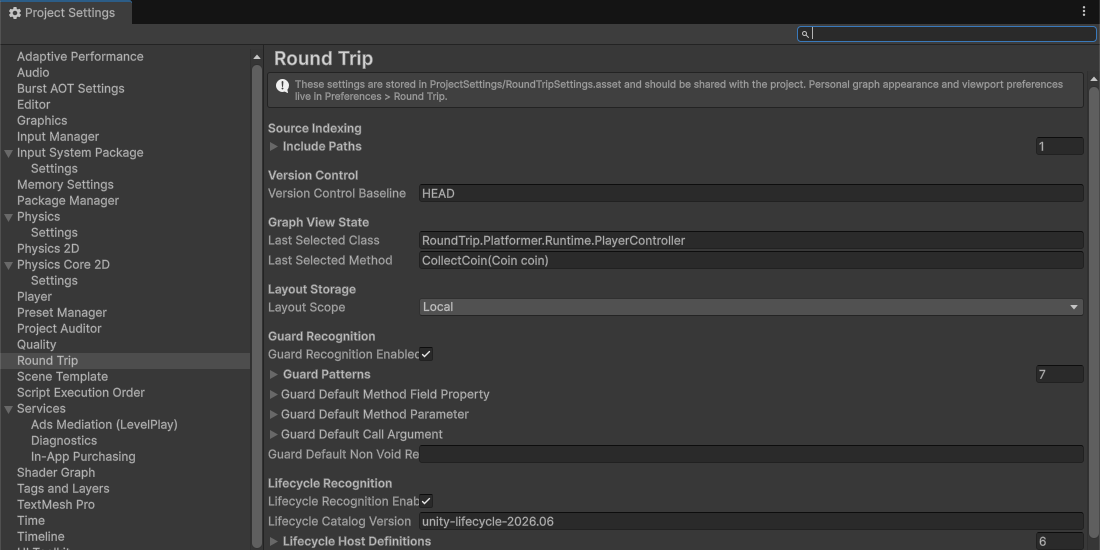
-
Open Project Settings > Round Trip. Add the source folders the team expects Round Trip to index. These include paths live in
ProjectSettings/RoundTripSettings.asset, alongside the other project-level Round Trip choices. -
Leave Layout Storage on
Localfor the normal team setup. Local writes graph configuration files underUserSettings/RoundTrip. Unity treatsUserSettingsas machine-local, so one teammate’s node positions, viewport, reroutes, collapse state, and comment popup placement do not become another teammate’s changes. -
Choose
Sharedonly when the team has agreed to review layout together. Shared writes under<Project>/RoundTrip. That folder is intended to be committed when shared graph configuration is a deliberate team artifact. -
Open Preferences > Round Trip on each machine. Theme, canvas, scrolling, zoom, edge routing, grid, and edge appearance are per-user preferences. A teammate can change them without changing the project’s source indexing or guard rules.
-
Give one person ownership of the open method while a visual draft is active. The person making the canvas edit reads Previewing your changes., checks the pending change (the panel’s Undo steps the most recent one back out), and presses Compile in the toolbar, the one Compile that writes every pending change. Moving nodes or changing a viewport does not write method behavior.
-
The programmer reviews the resulting source diff. They should see the C# call, branch, literal, or signature that represents the designer’s canvas edit. The method remains ordinary source and can be read with the project’s normal code review tools.
-
Now have the programmer rename a method in C# and save the file. Round Trip watches configured source roots, re-indexes changed
.csfiles, and re-parses the selected method. Calls and member names in the graph update from the new source identity after Unity is ready. -
If the programmer changes a file while the designer still has a draft, stop and reconcile before pressing Compile. The writer checks current source and refuses a stale write instead of covering the disk change.
A clean handoff
Section titled “A clean handoff”Use four sentences when handing a visual edit to a programmer:
- I changed
Class.Method. - The graph now calls or branches on this value.
- I pressed Compile.
- The source diff should contain this focused change.
Use the mirror when handing a source edit to a designer: name the class, method, renamed member, and gameplay reason. Round Trip supplies the re-parsed graph; the handoff supplies intent.
When it goes wrong
Section titled “When it goes wrong”When it goes wrong
| Symptom | Check | Fix |
|---|---|---|
| A teammate cannot find a class in Graph View. | Compare Project Settings > Round Trip source include paths. | Add the shared source folder to the project setting and let indexing finish. |
| Node positions differ between two machines. | Read the Layout Storage scope. | Keep Local if personal arrangements are expected, or agree on Shared before treating layout as common. |
| A method name looks old after a programmer renamed it. | Confirm the saved file is under a configured source root and Unity is idle. | Use Reload after compilation if the external refresh has not appeared yet. |
| Compile reports that the file changed. | Compare the programmer's disk edit with the designer's pending draft. | Reopen the method, recreate the intended draft on current source, then Compile. |
- Settings and preferences: see the full project and user boundary.
- Graph configuration files: understand what
.rt.jsonstores. - External edits: follow a source change back into the graph.