
What it does not do yet
The current Round Trip limits, why Compile refuses them and what to do in C# today.
On this page
Round Trip refuses a write when it cannot prove that the resulting C# keeps the meaning and shape of your method. Refusal is deliberate: the file stays unchanged, the message names the construct, and you can edit that part in C#. Saving the file makes Round Trip read the method again and update its diagram.
Recognize constructs you need to edit in C#
Select a screenshot to enlarge it.

Parsing and method bodies
Section titled “Parsing and method bodies”| Current edge | What you see | What to do today |
|---|---|---|
| An unknown statement syntax | A gray placeholder node. Any non-design placeholder refuses Compile for that method. | Edit the statement in C#, save, and let Round Trip re-parse it. |
| An unknown expression or operator | An unsupported expression, sometimes represented by a gray placeholder. | Keep that expression in C# and make visual edits only after the method parses without a blocking placeholder. |
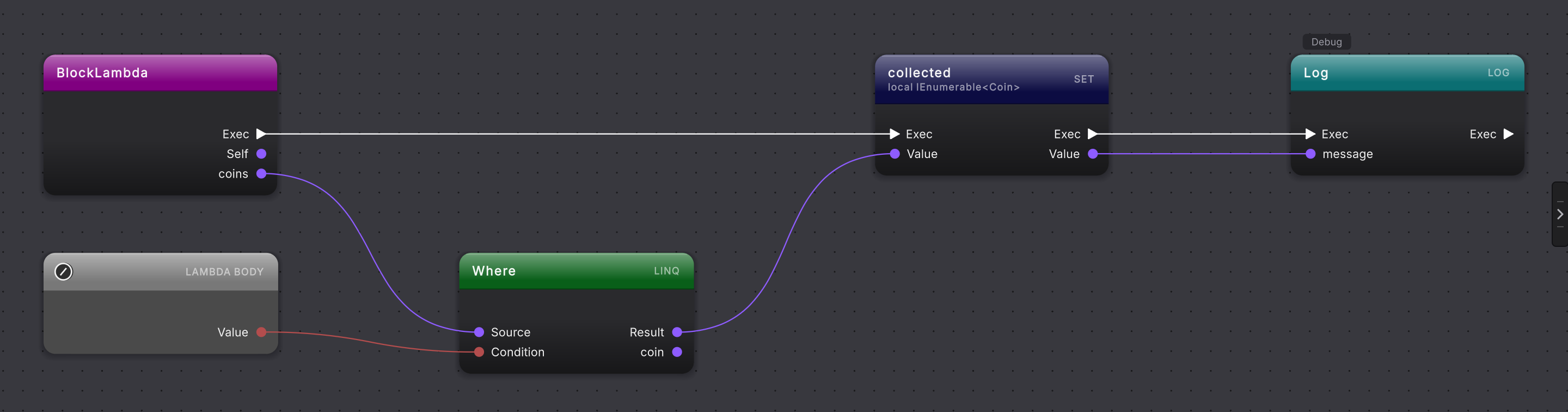
A LINQ lambda with a block body ({ ... }) |
The call and lambda are shown as ordinary call and lambda nodes rather than a LINQ operator with a drawn body. | Edit the lambda in C# when needed. |
A static expression-bodied LINQ lambda |
Its body is a gray Lambda body placeholder wired into the LINQ node. A non-design placeholder blocks Compile. | Edit the lambda in C#, save, and let Round Trip re-parse the method. |
| A typed menu on a data-pin drag | Dragging a data output pin to empty canvas opens its member menu, not a menu of nodes that accept it, so a dropped sequence wire offers no LINQ operators. Dragging a data input pin, such as a call’s argument, to empty canvas opens nothing, so it cannot offer a constant or other static value. | Right-click the canvas, place the LINQ node from the linq group or the value from static references, and drag the wire into the pin that takes it. |
A call argument passed ref or in, or by parameter name (Move(speed: 2f)), in a call Compile has to write |
The writer refuses by name, “an argument marked ref, out, or in” or “an argument passed by parameter name”, and leaves the method unchanged. An out argument is not refused: it is an output pin, and Compile writes it back in its place. |
Edit that call in C#, save, and let Round Trip re-parse it. |
| A declaration with multiple declarators in an emitted statement path | The writer refuses because one visual declaration cannot safely stand for every declared variable. | Split or edit the declaration in C#, then reopen the method. |
| A declaration with no initializer or input | Compile refuses to invent a value. | Supply the value in C#, or complete the supported visual input before compiling. |
| Nested deconstruction | The flattened diagram cannot prove the original nested shape. | Edit the nested deconstruction in C#. |
| An array construction used on its own, or an array literal outside a declaration | The writer refuses that placement. | Write that array expression in C# and let it re-parse. |
| A throw expression in an unsupported position | The writer names the throw expression and writes nothing. | Edit the expression in C#. |
| An incomplete or malformed created loop, switch or assignment | Compile refuses instead of inventing missing control flow or values. | Finish the node’s required pins and arms, or write the construct in C#. |
| Scope or flow that cannot be proven from the diagram | The refusal names the ambiguous structure and leaves the method unchanged. | Repair the structure in C#, then re-open the method. |
A yield return, yield break or await foreach created or changed on the canvas |
The diagram shows these statements in a coroutine or async method, and Compile keeps the existing ones byte-for-byte while you edit the statements around them. The writer refuses to compose a new or changed one, naming “a yield return”, “a yield break” or “an await foreach loop”. | Type that statement in C#. The rest of the method stays editable on the canvas. |
Declaration edits that refuse by name
Section titled “Declaration edits that refuse by name”These declaration boundaries refuse by name in 0.90.0:
- A field inside
#if, or a new field that would land there. - An enum member inside
#if, or a new enum member that would land there. - A field of a partial class declared in another file.
- An attribute edit on a multi-variable declaration such as
int a, b;. - An attribute Round Trip cannot resolve in the project.
- An attribute, member or type that is no longer in the source file.
- A new field in a struct, record or interface.
- A base type on a new enum.
- Whole-enum composition when several members share one line.
- A local in the file changed to
varwhen it has no value, or when its value isnullordefault.vartakes its type from the value, so the message reads like{name} was not retyped because it has no value for var to take its type from.Give the local a value such as0, or choose its type.
For the other cases, make that declaration change in C#. The next source refresh re-indexes and re-parses it. A refused draft stays pending and does not permit an approximate source write.
No backups or project-wide undo
Section titled “No backups or project-wide undo”Round Trip edits the real script files in your project and keeps no copies of them. Put the project under version control and commit before you edit, as Protect your game files shows.
| Current edge | What you see | What to do today |
|---|---|---|
| Undo covers only unsaved canvas edits | Undo and redo step through the open method’s draft. The history clears when Compile saves, when you open another method, when the window closes or Unity reloads scripts, and when a script changes outside Round Trip. | Restore a saved change from your last commit, or change the canvas back and press Compile. |
| Some actions write without Compile | Pressing Create on a new class or enum writes its script file, adding a lifecycle method writes the empty callback, and confirming Delete method removes the method from its script. | Commit before you use them; restore the file from that commit if one goes wrong. |
| No revert or diff in Round Trip | The method menu has no revert action, and Changes shows no diff: Round Trip does not stage, unstage, diff or restore files. | Restore the file from your last commit or check-in with your version-control tool, and read a file diff there. Or fix only the wrong part on the canvas and press Compile. |
Player controls use Send Messages
Section titled “Player controls use Send Messages”Your first class wires a Player Input set to Send Messages, and the picker reads Player Inputs saved in scenes and prefabs. It does not offer Invoke Unity Events or Invoke C# Events handlers, Player Inputs created at runtime, children reached by Broadcast Messages, or a Behavior overridden on one prefab instance. A Send Messages button calls its method on press only. Writing the actions file is not undoable, and the key lists do not warn about a key another action already uses. For any of these, use Unity’s Input Actions editor or read the action in Update with InputSystem.actions.FindAction, as Your first class does for Move.
No runtime execution or debugger view
Section titled “No runtime execution or debugger view”Round Trip lets you read and edit C# visually in the editor. It has no runtime execution trace, live node highlight or visual-script debugger view. Use Unity’s normal play-mode, logging and debugging tools to inspect behavior while the game runs.
Layouts are shared only when you choose it
Section titled “Layouts are shared only when you choose it”Local layout storage is the default. Files under <Project>/UserSettings/RoundTrip are machine-local, so another teammate may arrange the same method differently. Choose shared storage in Project Settings > Round Trip when the team wants diagram layout configuration under <Project>/RoundTrip to travel together.
Layout tools stop at the grid
Section titled “Layout tools stop at the grid”Snap to grid places every node and pill on the grid, the six align commands line a selection up on the primary node’s edge or center, Distribute horizontally and Distribute vertically space three or more selected nodes evenly, and an arrow key nudges the selection one grid cell. There is no action to straighten an existing wire’s route; an align target is the primary’s edge or center, so an aligned node can rest between grid dots until you move it again. Drag, align, distribute, wire knots, and Auto layout cover arrangement today.
Why the list is specific
Section titled “Why the list is specific”Roslyn can parse more C# than Round Trip can safely represent and write. Support is versioned by construct, not described as all-or-nothing. A method may remain useful to read even when one gray placeholder makes visual write-back unavailable.
Missing something you need? Browse Round Trip feature ideas and the roadmap, or suggest and vote on improvements. Votes help us prioritize; they do not promise delivery. For a bug or help with a current limitation, use support instead, and keep private project details in a private ticket.
- Supported C#: see the broader supported, partial and unsupported matrix.
- When it refuses: read a refusal and recover without losing source.
- Release notes: see which boundaries moved in recent versions.