
What you get
Tour the Explorer, canvas, authoring, Compile flow, graph configuration and Platformer example.
On this page
Round Trip gives you one Unity editor window for building gameplay without writing C# and for understanding C# that already exists, whether you, an assistant, or a stranger wrote it. Pick a class on the left, work on its method in the center, and inspect the selected thing on the right.
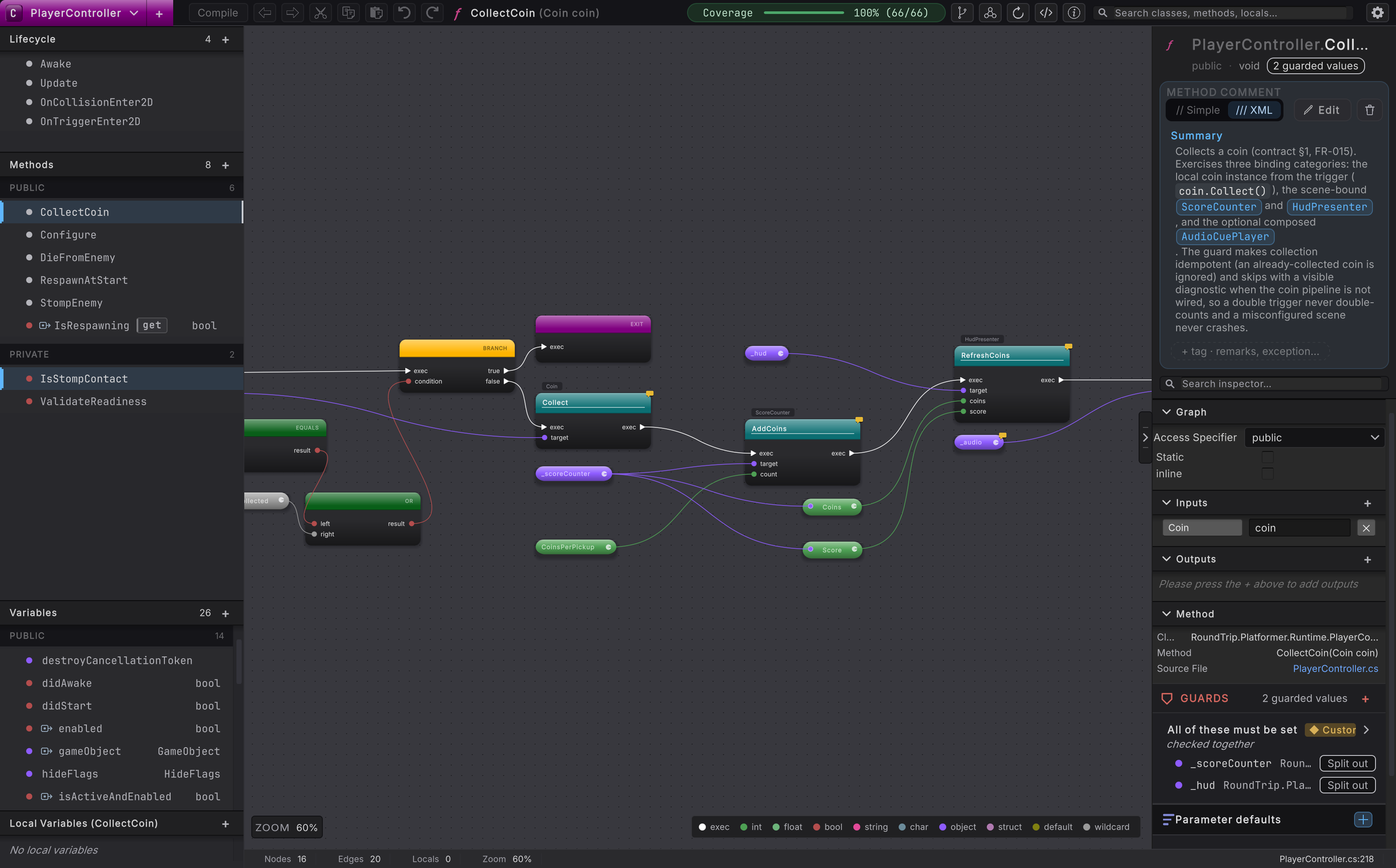
PlayerController.CollectCoin.The Explorer
Section titled “The Explorer”The left rail indexes C# classes from the folders you choose. Open a class to see methods grouped by access, plus its variables, properties, events and other members. Selecting a method opens the graph derived from that method’s source.
Learn the class and member model in Explorer, then practice on unfamiliar code in Read a class you did not write.
The canvas
Section titled “The canvas”The center canvas turns a method body into nodes, pins and wires. Exec wires show order. Typed data wires show where values come from. GET reads can collapse into compact pills, while literals sit directly on unwired pins. The visual language is inspired by Unreal Engine Blueprint and goes further: because a graph is plain C#, a method can be a Unity coroutine or an async method, with its yields and awaits drawn on the canvas.
Learn the visual language in Canvas and its control-flow shapes in Flow.
Authoring
Section titled “Authoring”You can create classes, methods, fields, defaults, lifecycle methods and enums. Inside a method, the action menu and pin gestures build calls, branches, loops, switches, assignments and supported expressions. These changes begin as drafts, visible before they touch the file.
Learn the creation tools in Authoring, or build something immediately in Your first method.
Compile
Section titled “Compile”Compile is the explicit step that writes a draft to C#. Round Trip plans the narrowest safe source edit, uses an atomic overwrite, asks Unity to import the change, then parses the file again. If it cannot represent a construct faithfully, it refuses and leaves the method unchanged.
Learn that loop in Compile and try it end to end in Change it visually, then Compile.
Graph configuration files
Section titled “Graph configuration files”Files ending in .rt.json store graph configuration: node positions, viewport, reroute knots, collapse state and comment popup placement. They are never a second source language. Choose local storage under <Project>/UserSettings/RoundTrip or shared storage under <Project>/RoundTrip.
Learn what belongs in each scope in Graph configuration files.
The Platformer example
Section titled “The Platformer example”The Platformer project is a playable 2D level with coins, enemies, a score, a locked goal and a small set of scripts built for graph reading. CollectCoin, StompEnemy, OnCoinCountChanged and DieFromEnemy are the main showcase methods.
Take the guided route through Platformer and the Platformer graph tour.
Where the edges are
Section titled “Where the edges are”Round Trip can parse more C# than it can safely write. Unsupported statements appear as gray placeholder nodes, and some declaration shapes are refused by name. Read what it does not do yet before planning a large conversion; the page pairs each current edge with the C# route you can use today.
- C# is the truth: understand the source and configuration boundary.
- Three ways in: build without code, check an AI’s edit, or bring in existing scripts.
- Platformer: play the example and open its showcase graphs.